














Object Show Voting Simulator is a browser-based simulation game inspired by the “object show” genre of animated web series. In these shows, everyday objects are turned into characters who compete in challenges while viewers vote to eliminate contestants. The simulator recreates this structure by allowing players to organize a fictional competition and determine which characters stay in the game or leave after each round. The experience focuses on managing contestants, arranging teams, and observing how voting results influence the progression of the show. Object shows such as Battle For Dream Island helped popularize the idea of viewer voting as a core element of elimination competitions.



Object Show Voting Simulator
Advertisement
Advertisement








Object Show Voting Simulator is a browser-based simulation game inspired by the “object show” genre of animated web series. In these shows, everyday objects are turned into characters who compete in challenges while viewers vote to eliminate contestants. The simulator recreates this structure by allowing players to organize a fictional competition and determine which characters stay in the game or leave after each round. The experience focuses on managing contestants, arranging teams, and observing how voting results influence the progression of the show. Object shows such as Battle For Dream Island helped popularize the idea of viewer voting as a core element of elimination competitions.
Creating A Competition
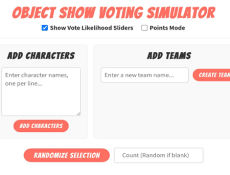
At the beginning of Object Show Voting Simulator, the player prepares the cast of contestants. These contestants are usually animated objects such as tools, food items, or everyday household items. The player can select existing characters or create custom ones with unique names and appearances.
After choosing the contestants, the player divides them into teams. Team organization is important because challenges and elimination rounds are often structured around team performance. Once the teams are prepared, the simulation begins and the competition progresses through multiple rounds where characters compete and eventually face elimination.
Voting And Elimination Mechanics
The central feature of Object Show Voting Simulator is the voting system. After each challenge, one team or group of contestants may be placed “up for elimination.” The voting process then determines which character leaves the competition.
Players usually interact with the simulator by performing actions such as:
- selecting contestants and creating teams
- running challenge rounds for the competition
- opening elimination votes after each round
- counting votes for or against contestants
- removing the contestant who receives the elimination result
Different voting styles can change how eliminations work. Some systems remove the contestant with the most negative votes, while others allow viewers to vote for characters they want to save.
Progression Toward The Final Winner
As eliminations continue, the number of contestants decreases. The remaining characters must compete in additional rounds until only a few participants remain in the competition. These final stages usually involve more intense challenges or special voting rounds.
The progression system creates a clear structure similar to a television game show. Early rounds focus on large teams, while later rounds highlight individual contestants competing for survival in the game.
Object Show Voting Simulator focuses on recreating the structure of elimination-based competition shows. By selecting contestants, organizing teams, and running voting rounds, players simulate the process of producing an object show season. The experience emphasizes organization and decision-making rather than direct action gameplay, allowing players to observe how a competition evolves until one contestant remains as the winner.
Comments (0)


2026
