













Numberblocks Generator Scratch is an interactive mathematical game where players can create Numberblock characters and experiment with different numerical values. Inspired by the Numberblocks animated series, the project transforms numbers into arrangements of colored blocks. Players can explore counting, arithmetic, fractions, and mathematical patterns without following a fixed lesson. There is no traditional storyline, enemy encounters, or character progression. Instead, the experience centers on choosing numbers and discovering how their visual representations change.


Numberblocks Generator Scratch
Advertisement
Advertisement






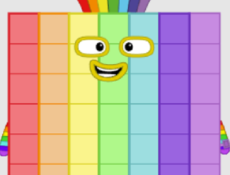
Numberblocks Generator Scratch is an interactive mathematical game where players can create Numberblock characters and experiment with different numerical values. Inspired by the Numberblocks animated series, the project transforms numbers into arrangements of colored blocks. Players can explore counting, arithmetic, fractions, and mathematical patterns without following a fixed lesson. There is no traditional storyline, enemy encounters, or character progression. Instead, the experience centers on choosing numbers and discovering how their visual representations change.
What Happens When You Change a Number?
Every Numberblock represents a specific quantity. Increasing its value adds more blocks, while decreasing it produces a smaller arrangement. Players can make adjustments one step at a time or enter an exact number to generate a particular character. This makes it possible to investigate differences between consecutive numbers, recognize multiplication patterns, and observe how larger quantities are organized. The generator also supports fractional values, allowing experiments with numbers that are not whole.
Different Tools for Exploring Mathematics
The Scratch interface provides multiple ways to select values and examine their properties. Players can combine these controls to create their own mathematical activities.
The main functions include:
- Generating characters that represent numerical values.
- Adding blocks in different increments.
- Subtracting quantities from the current number.
- Entering specific numbers through the SET option.
- Using a slider to move between values.
- Exploring fractions and larger numbers.
- Opening CLUBS to investigate numerical relationships.
Players can use these features to compare numbers, identify multiples, and examine patterns that appear when values change.
How to Use the Scratch Project
Press the green flag to start Numberblocks Generator Scratch. Once the character appears, open the menu using the button with three horizontal bars. Select an addition or subtraction option to modify the displayed number. Different menu pages contain additional controls for making larger adjustments. The SET function allows players to type an exact value, while the slider provides another method for selecting numbers.
The game does not contain numbered levels, scores, or a final challenge. Players decide what to explore and how long to continue. They might generate a sequence of even numbers, compare multiples of three, or experiment with fractional quantities. The absence of fixed objectives makes the generator suitable for independent mathematical exploration and practicing arithmetic through visual interaction.
Comments (0)

2026
