



















Zombie Driving Game is an arcade driving game set during a zombie outbreak. The player controls a vehicle, moves through roads filled with undead enemies, and tries to travel as far as possible. There is no detailed story with named characters or dialogue. The setting provides a simple objective: survive the journey, remove zombies from the road, and continue progressing through increasingly difficult sections.



Zombie Driving Game
Advertisement
Advertisement










Zombie Driving Game is an arcade driving game set during a zombie outbreak. The player controls a vehicle, moves through roads filled with undead enemies, and tries to travel as far as possible. There is no detailed story with named characters or dialogue. The setting provides a simple objective: survive the journey, remove zombies from the road, and continue progressing through increasingly difficult sections.
Road-Based Gameplay
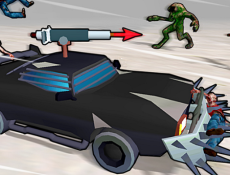
Each run combines driving, vehicle balance, shooting, and obstacle avoidance. Zombies appear directly in the vehicle’s path, while abandoned cars and environmental barriers can slow the player down or end the attempt. Weapons allow the vehicle to clear groups of enemies before impact. Coins collected during a run are used for progression, so successful driving depends on both distance and the number of resources gathered.
Vehicles and Progression
Zombie Driving Game includes a selection of vehicles that can be purchased through the in-game shop. Players can also modify their current vehicle by changing its weapons and armor. These improvements affect how well the car handles contact with zombies and obstacles. Progress is based on repeated runs, earning coins, increasing the player level, and improving the available equipment rather than following a traditional chapter-based campaign.
The main gameplay elements include:
- driving through zombie-filled roads;
- firing mounted weapons at enemies;
- avoiding vehicles and other obstacles;
- collecting coins during each attempt;
- upgrading armor and weapons;
- purchasing additional vehicle models;
- reaching longer distances and increasing the player level.
The game does not appear to use separate story levels with individual missions. Instead, difficulty grows as the player continues driving and encounters more hazards. This structure makes each attempt part of the overall progression. Better vehicle equipment helps the player stay on the road longer, but controlling the car remains important because poor landings or collisions can quickly stop a run.
How to Control the Vehicle
Press W to accelerate and use A and D to tilt the vehicle while it is moving through the level. Tilting is useful when climbing slopes, jumping over gaps, or correcting the car before landing. Players should collect coins whenever possible, fire at zombies blocking the route, and avoid unnecessary contact with obstacles. After a run, earned resources can be spent on upgrades before starting another attempt.
Comments (0)


2026
